Vector Databases 101: From Experiments to Mission-Critical RAG in 2026
How .NET teams move from RAG demos to reliable vector database systems with Azure, Pinecone, and Weaviate in 2026.
Most .NET teams met vector databases through small RAG demos. A few documents, a quick embedding step, and a chatbot that looked impressive during a demo. Then real questions started to appear. How does this run in production. How to handle millions of documents, real time updates, and strict service level agreements. How to stop costs from growing too fast.
Between 2024 and 2026, vector search moved from side project to first class database feature. Microsoft now integrates vector indexes into services like Azure Cosmos DB. Research from Microsoft reports vector search in Cosmos DB with less than 20 ms latency on 10 million vectors and much lower query cost than dedicated vector database services such as Pinecone and Zilliz in tested scenarios. Enterprise experiments have turned into production systems in healthcare, legal, and public sector workloads.
This article explains what vector databases do, how they power Retrieval Augmented Generation, and how .NET and Azure focused teams can select platforms, design architectures, and monitor live systems. The focus stays on production detail, not lab benchmarks. If you are new to vector databases and semantic search concepts, our companion article Vector Databases and Semantic Search: Building Modern Web Applications in 2026 covers the foundational ideas.
1. What a vector database really does
1.1 From keywords to meaning and hybrid search
Traditional search engines match words. If a user types "leave policy", the engine looks for those exact terms or close variants. It does not understand that "annual leave" and "vacation policy" refer to the same topic unless that link is encoded by hand.
Vector search uses dense embeddings. An embedding model converts a piece of text into a high dimensional dense vector. Similar meanings sit close together in that space, even if the words are different. A vector database stores these dense vectors and finds the nearest neighbours for a query vector.
Sparse vectors look more like classic keyword features. Each dimension often maps to a token or ngram, and most dimensions are zero. Systems such as BM25 or SPLADE can produce sparse representations that keep strong signals for rare and exact terms. Hybrid search combines dense and sparse vectors so that both meaning and rare keywords count.
In practice, this means a query like "how many days off can I take each year" can retrieve documents about "annual leave policy" by semantic similarity, while hybrid sparse signals keep exact matches for numbers and unique phrases.
In 2026, hybrid search is the production default. Dense vectors handle meaning. Sparse vectors handle rare terms and identifiers. Engines such as Azure AI Search and Pinecone can fuse both signals inside one query.
1.2 Why a dedicated vector store and modern ANN
It is possible to store vectors in any database. A simple table with an array column can hold them. The hard part is efficient search when the corpus is large.
Vector search needs approximate nearest neighbour (ANN) algorithms. Common examples are HNSW, IVF, and DiskANN. These structures:
- Build graph or tree like indexes over millions of vectors
- Keep recall high while keeping latency low
- Support incremental updates and deletes without constant full rebuilds
Dedicated vector databases and modern cloud databases with vector extensions wrap these algorithms with:
- Typed vector columns and distance metrics
- Index maintenance, sharding, and replication
- Hybrid queries that mix vector and metadata filters
- Security, tenancy, and backup integration with the rest of the stack
The clear trend in 2026 is that stand alone vector databases continue, but large vendors now embed vector indexing into mainstream operational databases and search services.
2. RAG architecture in plain terms
2.1 The basic RAG loop
Retrieval Augmented Generation combines a language model with a retrieval system. The loop is simple.
- A user asks a question.
- The system embeds that question as a dense vector and often also creates a sparse representation.
- The vector database returns the most relevant document chunks using hybrid search.
- The language model receives the question plus retrieved context and generates an answer grounded in those documents.
This solves two core problems.
- The base model may not know organisation specific content at all.
- Even with long context, models struggle when relevant facts are buried among many pages.
With good retrieval, accuracy gains in specialised domains can reach double digit percentage points compared with a base model alone. Healthcare studies report GPT 4 with a RAG pipeline reaching 91.4 percent accuracy on certain medical question answering tasks, higher than human physicians in the same evaluation.
An accuracy improvement (\Delta A) is often observed where (\Delta A = A_{RAG} - A_{Base} > 0.10). Here (A_{RAG}) is the accuracy with retrieval and (A_{Base}) is the accuracy of the base model without context.
2.2 Visual RAG flow for .NET and Azure
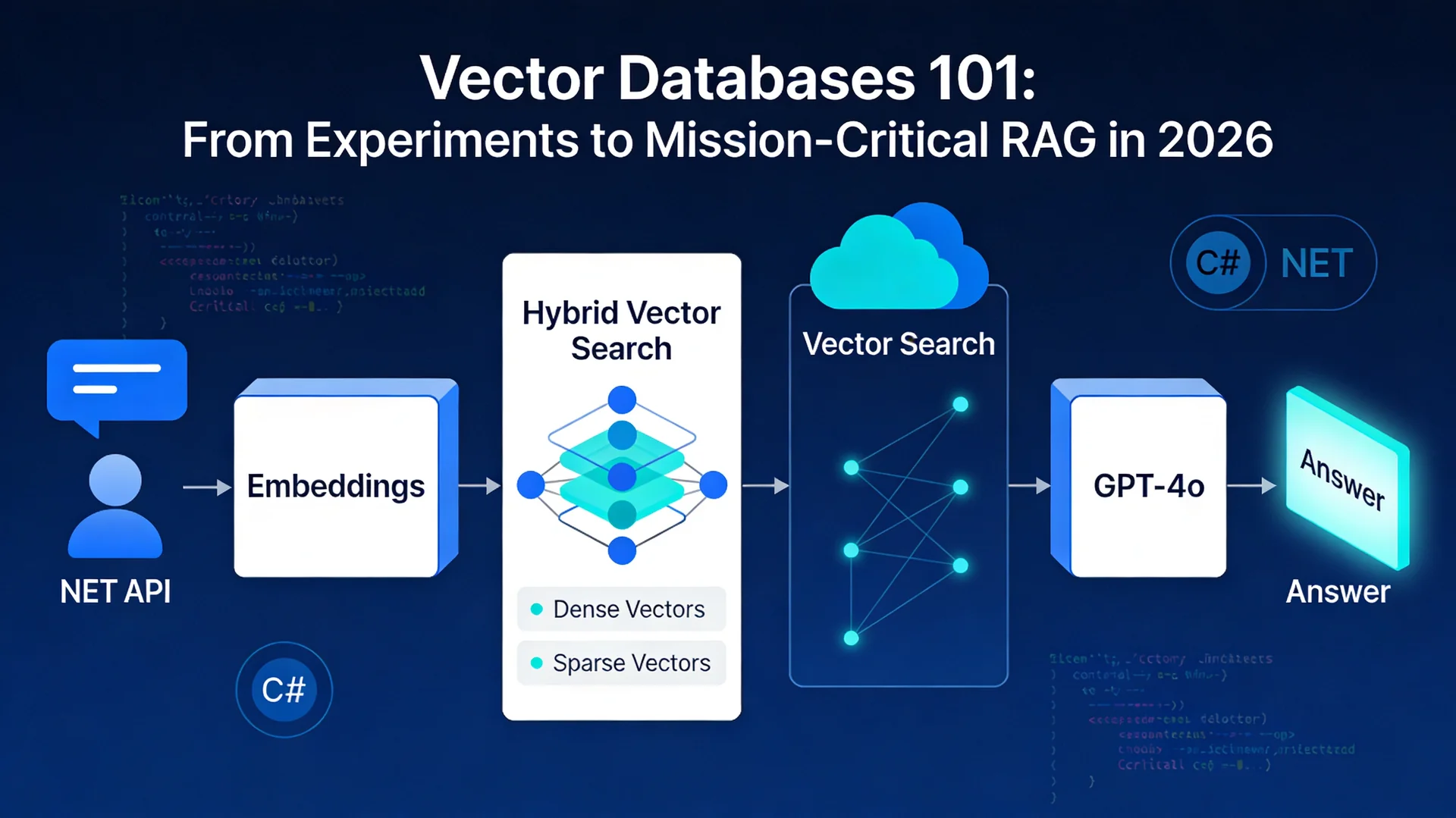
The high level flow for a .NET and Azure RAG system looks like this.
User Question
      |
      v
 ASP.NET API  ---> Logging and metrics
      |
      v
Embedding Service (Azure OpenAI)
      |
      v
Hybrid Vector Search (Azure AI Search or Cosmos DB)
      |
      v
Ranked Context Chunks
      |
      v
GPT 4o (Azure OpenAI) with RAG prompt
      |
      v
Grounded Answer back to user
This diagram shows how the ASP.NET API sits in front of Azure OpenAI, Azure AI Search or Cosmos DB, and the logging layer.
2.3 A practical .NET RAG architecture
A production ready RAG system for .NET and Azure teams usually has these parts.
Ingestion pipeline
- Reads source data such as PDFs, HTML, database rows, and CRM notes.
- Normalises formats and splits documents into chunks.
- Calls an embedding model such as Azure OpenAI text embeddings.
- Writes chunks plus metadata and vectors into a vector store or vector enabled database.
Retrieval API built with ASP.NET
- Accepts chat or search queries.
- Embeds queries using the same embedding model.
- Runs a hybrid vector search with optional keyword and metadata filters.
- Returns ranked context chunks and metadata.
Generation layer
- Calls a model such as Azure OpenAI GPT 4o with a RAG prompt template.
- Includes retrieved context, user question, and system rules.
- Applies safety, masking, and policy filters before returning the answer.
Observability and feedback
- Logs each step with timings, index used, and context size.
- Tracks cost per query and error rates.
- Runs regular evaluations of retrieval quality and hallucination rates.
The vector database sits in the retrieval box. Everything else is standard .NET and Azure architecture. Teams building on .NET 10 can take advantage of the latest performance and AI integration features covered in .NET 10: Unleashing Next-Generation Performance and Enterprise Features.
3. Platform comparison: Azure AI Search vs Pinecone vs Weaviate
The three platforms below are common choices for .NET RAG projects in 2026.
3.1 Quick comparison table
| Feature or Concern | Azure AI Search | Pinecone | Weaviate |
|---|---|---|---|
| Hosting model | Fully managed Azure PaaS | Fully managed multi region SaaS | Open source and managed cloud |
| Best fit | Azure centric stacks and security heavy workloads | Low latency, global SaaS, high scale | Flexible schemas and open ecosystem |
| .NET support | Azure SDK for .NET and official samples | Official .NET SDK and guides | Official C# client and quickstarts |
| Hybrid search | Native hybrid dense plus sparse search with fusion | Dense plus sparse vector search in one API | Near text, filters, and generative search in one query |
| Operations and security | Azure RBAC, VNETs, Private Link, managed identities | API key based, network controls by plan | Depends on deployment, supports TLS and auth plugins |
| Cost pattern | Charged by capacity units and storage | Usage based on index size and queries | Infrastructure cost if self hosted or per cluster in cloud |
All three can support production RAG workloads. For teams planning a broader cloud move, our 2025 Cloud Migration Reality guide covers what actually works versus marketing hype. The choice often follows these lines.
- Azure AI Search when data and apps already sit in Azure and there is a need for tight integration with Azure OpenAI, Cosmos DB, and enterprise security.
- Pinecone when global latency, advanced hybrid search, and a managed service independent of any cloud vendor are important.
- Weaviate when teams want an open source option with flexible schema and built in generative search, either self hosted or in Weaviate Cloud.
Azure Cosmos DB vector search is also important. Research shows Cosmos DB with a DiskANN based index can reach comparable recall to specialised vector databases while delivering around 43 times lower query cost than some serverless vector SaaS products in one test. For systems already standardised on Cosmos DB, this reduces the need for a separate vector service.
4. Hands on: .NET examples with each platform
The code below focuses on core ideas. Each snippet leaves out configuration, exception handling, and secrets management. In production, secrets should come from Azure Key Vault or environment variables, not from hard coded strings.
4.1 Azure AI Search vector query in C#
The official Azure samples show vector search using the Azure.Search.Documents client library and Azure AI embeddings. A simplified pattern looks like this.
using Azure;
using Azure.AI.OpenAI;
using Azure.Search.Documents;
using Azure.Search.Documents.Models;
using System;
using System.Collections.Generic;
using System.Threading.Tasks;

public sealed class AzureSearchVectorDemo
{
    private readonly OpenAIClient _openAI;
    private readonly SearchClient _searchClient;

    public AzureSearchVectorDemo(string openAiEndpoint, string openAiKey,
                                 string searchEndpoint, string indexName, string searchKey)
    {
        _openAI = new OpenAIClient(new Uri(openAiEndpoint), new AzureKeyCredential(openAiKey));

        _searchClient = new SearchClient(
            new Uri(searchEndpoint),
            indexName,
            new AzureKeyCredential(searchKey));
    }

    public async Task RunAsync()
    {
        // 1. Embed the user query
        string question = "Which policies cover maternity leave in Australia?";
        var embeddingResponse = await _openAI.GetEmbeddingsAsync(
            "text-embedding-3-small",
            new EmbeddingsOptions(question));

        IReadOnlyList<float> vector = embeddingResponse.Value.Data[0].Embedding;

        // 2. Build a vector query
        var vectorQuery = new VectorQuery(
            vector: vector,
            kNearestNeighborsCount: 5,
            fields: "contentVector");

        // 3. Run hybrid search: keyword plus vector in one call
        SearchResults<SearchDocument> results =
            await _searchClient.SearchAsync<SearchDocument>(
                searchText: "maternity leave",
                new SearchOptions
                {
                    VectorQueries = { vectorQuery },
                    Size = 5,
                    Select = { "title", "url", "snippet" }
                });

        await foreach (SearchResult<SearchDocument> result in results.GetResultsAsync())
        {
            Console.WriteLine(result.Document["title"]);
        }
    }
}
This pattern uses Azure OpenAI to generate a query embedding, sends both a keyword query and a vector query to Azure AI Search, and lets the service fuse results using Reciprocal Rank Fusion so that both text relevance and semantic similarity influence ranking. For a deeper look at integrating AI models with .NET, see Building with Claude & .NET: A Developer's Guide to AI Integration.
4.2 Pinecone with the official .NET SDK
Pinecone provides an official C# SDK that supports vector operations and its own embedding API.
using Pinecone;
using Pinecone.Grpc;

public sealed class PineconeDemo
{
    private readonly PineconeClient _client;

    public PineconeDemo(string apiKey)
    {
        _client = new PineconeClient(apiKey);
    }

    public async Task QueryAsync()
    {
        var index = _client.Index("knowledge-base");

        // Embed the query using Pinecone Inference
        string queryText = "How do I submit an expense claim?";
        var embedding = await _client.Inference.EmbedAsync(new EmbedRequest
        {
            Model = "multilingual-e5-large",
            Inputs = new[] { queryText },
            Parameters = new Dictionary<string, object?>
            {
                ["input_type"] = "query",
                ["truncate"] = "END"
            }
        });

        float[] queryVector = embedding.Data[0].Values.ToArray();

        var response = await index.QueryAsync(new QueryRequest
        {
            TopK = 5,
            Vector = queryVector,
            Namespace = "internal-policies",
            IncludeMetadata = true
        });

        foreach (var match in response.Matches)
        {
            Console.WriteLine($"{match.Score} :: {match.Metadata["title"]}");
        }
    }
}
This pattern suits cross cloud or multi region SaaS products where Pinecone acts as a central semantic layer over documents and logs.
4.3 Weaviate C# client example
Weaviate offers an official C# client that can connect to self hosted or managed clusters.
using System;
using System.Collections.Generic;
using System.Threading.Tasks;
using Weaviate.Client;
using Weaviate.Client.Models;

public sealed class WeaviateDemo
{
    public async Task RunAsync()
    {
        string weaviateUrl = Environment.GetEnvironmentVariable("WEAVIATE_URL")!;
        string weaviateApiKey = Environment.GetEnvironmentVariable("WEAVIATE_API_KEY")!;

        // 1. Connect to Weaviate Cloud
        WeaviateClient client = await Connect.Cloud(weaviateUrl, weaviateApiKey);

        const string collectionName = "Document";

        // 2. Create or reset the collection
        await client.Collections.Delete(collectionName);

        var documents = await client.Collections.Create(new CollectionCreateParams
        {
            Name = collectionName,
            VectorConfig = Configure.Vector("default", v => v.Text2VecWeaviate())
        });

        // 3. Insert some data
        var dataObjects = new List<object>
        {
            new { title = "Leave Policy", content = "Details about annual and sick leave." },
            new { title = "Travel Policy", content = "Rules for domestic and international travel." }
        };

        await documents.Data.InsertMany(dataObjects);

        // 4. Run a semantic search
        var result = await documents.Query.NearText("maternity leave policy", limit: 5);

        foreach (var obj in result.Objects)
        {
            Console.WriteLine(obj.Properties["title"]);
        }
    }
}
Weaviate handles text to vector generation internally through configured modules. For some teams this removes the need to call a separate embedding service.
5. From demo to production: key challenges
Many pilots stay in the lab because they ignore three production constraints.
- Continuous data change.
- Multi source retrieval.
- Cost and performance at real scale.
5.1 Streaming and real time updates
Most vector indexes were designed for batch workflows. In production, documents change all the time. Knowledge bases get new releases. CRM notes arrive every minute. Security policies update weekly.
Modern designs are improving.
- Azure Cosmos DB keeps its vector index in sync with underlying data per partition and reports stable recall even when updates are frequent.
- Research work such as MicroNN explores updatable vector search in constrained or on device settings for real world workloads.
For .NET and Azure teams, practical patterns include the following.
Event driven ingestion
- Use Azure Event Grid or Service Bus to emit events when a document changes.
- A background worker or Azure Function generates a new embedding and updates the vector index.
Soft deletes and versioning
- Keep old vectors until new ones are written, then mark them as inactive with metadata.
- Apply retrieval filters on an "isActive" flag so that index rebuilds and updates do not break queries.
Separate hot and cold indexes
- Keep frequently changing data in a smaller index that is cheap to update.
- Store historical data in a large, mostly static index that rarely changes.
- At query time, search hot and cold indexes and merge the scores.
5.2 Federated and hybrid search across stores
Enterprises rarely have a single source of truth. Product documentation, support tickets, CRM, and logs live in different systems.
Research supports two strategies.
- Hybrid relational and vector queries inside a single relational engine or cloud database, as seen in systems like CHASE and similar work.
- Federated vector search over multiple stores and serverless infrastructures, such as SQUASH and related designs.
In practice, three patterns work well for .NET teams.
Search aggregator API
- An ASP.NET service fans out one query to multiple indexes or services such as Azure AI Search, Cosmos DB vector index, or Pinecone.
- It normalises scores and merges results before sending context to the language model.
Unified feature store
- Where possible, centralise embeddings into one service such as Azure AI Search or Cosmos DB, with metadata for source system, permissions, and freshness.
- Use hybrid filters so user or tenant attributes restrict which records can appear in context.
Query routing
- Use a light classifier or rule engine to route queries to the right index.
- For example, billing questions go to the finance corpus and product questions go to the documentation corpus.
5.3 Cost optimisation at scale and vector quantization
Real world RAG systems often spend more on model calls than on vector databases. An industry guide notes that a single query against a huge knowledge base can cost 10 to 20 dollars in API fees if it is not designed with care.
Vector index design still matters. The Cosmos DB study measured around 43 times lower query cost for its built in vector search compared with some serverless vector SaaS products in one test scenario. But the bigger levers often sit above the database.
Useful strategies include these.
Limit context size carefully
- Retrieve a small top k, then re rank if needed.
- Compress chunks and remove boilerplate.
Cache both embeddings and answers
- Cache embeddings for common queries such as FAQs.
- Cache full responses for idempotent questions and use short timeouts to keep answers fresh.
Adaptive retrieval
- Reinforcement learning based approaches train policies that decide when to retrieve and how many chunks to fetch, balancing accuracy with cost.
- Even simple heuristics help, such as skipping retrieval for very short, generic chat messages.
Measure cost per successful answer
- More context does not always improve quality.
- Regular evaluation reveals the sweet spot between number of retrieved documents, latency, and accuracy.
Vector quantization is another key lever in 2026. Quantization compresses vectors by reducing precision or mapping them to smaller codebooks. This reduces memory usage and can improve cache hit rates.
- Product quantization and related methods split a vector into blocks and store each block as a short code instead of full float values.
- Systems such as SQUASH and MicroNN combine disk based storage with quantization to keep query times low on large datasets and limited hardware.
- In practice, quantization often trades a small drop in recall for large savings in memory and cost, which is acceptable for many enterprise RAG systems.
A simple way to think about this trade off is as a cost function for a given configuration.
[ C = C_{compute} + C_{storage} + C_{latency_penalty} ]
Quantization and index choice tune (C_{storage}) and (C_{compute}). Evaluation and service level targets define the acceptable (C_{latency_penalty}) for a given use case.
6. Observability: making RAG safe for production
Logging only HTTP 200 or 500 codes is not enough. A RAG system can return incorrect or unsafe content while still returning 200 OK.
Modern observability stacks for RAG look at four areas.
- Retrieval quality.
- Generated answer quality.
- Latency.
- Cost.
6.1 Evaluating retrieval and answers
Open source tools such as Opik provide structured metrics.
- Context recall.
- Context precision.
- Answer relevance.
- Hallucination score.
- Moderation score.
These are often computed using a language model judge pattern. A second model receives the question, retrieved context, and answer, then scores the result against a rubric. Scores are stored alongside traces so that different versions of prompts, models, and indexes can be compared.
Security focused vendors also show how real time evaluators can watch for hallucinations and unsafe content in live traffic. Techniques include the following.
- Response validation that checks factual grounding against retrieved documents.
- Personal data detection and blocking.
- Policy checks for compliance such as HIPAA or GDPR.
For .NET systems, this usually means logging structured events for each RAG step through Application Insights or OpenTelemetry, sending traces and metric samples to an evaluation service, and storing offline evaluation runs so that changes can be rolled out safely.
6.2 Key metrics to track
A practical metric set for RAG in production focuses on these items.
Latency.
- Total time from user request to answer.
- Time spent in embedding, vector search, re ranking, and generation.
Quality.
- Offline scores for context precision and recall on a labelled test set.
- Hallucination rate estimated by language model judges or human review.
Usage and cost.
- Number of tokens sent to and from models per request.
- Number of vector queries and their distribution by index.
- Cost per successful answer and cost per user session.
Risk.
- Percentage of responses flagged by moderation.
- Number of manual escalations from users.
By wiring these into dashboards and alerts, teams can treat RAG systems like any other critical backend rather than a black box.
7. Real world case studies and maturity signals
7.1 Healthcare question answering and triage
Healthcare is a strict test for RAG. Accuracy and traceability are essential, and hallucinations carry real risk.
Recent studies include the following.
- A review of medical RAG systems that reports accuracy improvements between about 11 and 13 percentage points over base GPT 4 Turbo on open medical question answering tasks when retrieval and careful chunking are used.
- A medical information extraction system where GPT 4o with a RAG pipeline reached about 91.4 percent accuracy across categories, with each category above 80 points, outperforming other models and baselines.
- A comparison of fine tuned medical models versus RAG that highlights RAG as a strong option when up to date information and explainability are important.
Other healthcare chatbots use vector databases such as Qdrant and Chroma to store embeddings for medical texts and reference books. These systems typically show faster access to domain specific knowledge and lower hallucination rates versus open web models.
These results show that vector based RAG is now more than a toy in this domain. It is a pattern under active clinical evaluation. Organisations looking at document heavy workflows should also explore IDP 2026: Beyond Automation to AI Decision Support, which covers how intelligent document processing complements RAG pipelines.
7.2 Government and tax information
Public sector projects use RAG to make policies and tax rules easier to understand.
Examples include these.
- A RAG system for policy communication that retrieves from a large corpus of government documents and uses GPT models to answer citizen questions about rules and eligibility, with a focus on semantic search over official texts.
- Guidance on how state and local tax agencies use RAG based assistants to help call centre staff answer citizen tax questions more quickly and accurately by grounding models on tax law, training material, and past call transcripts.
- Public sector management case studies that show RAG powered chatbots giving accurate answers by referencing specific legal articles and regulations instead of vague summaries.
These projects use vector search to find the right paragraphs in laws and then let the language model explain them in plain language. That is directly relevant to Australian agencies and tax information as well. For context on how the Australian government is positioning for AI adoption, see Australia's National AI Plan 2025: How Government & Enterprise Should Position for Growth.
7.3 Enterprise and CRM style use cases
Enterprise chatbots need more than documentation search. They must respect permissions, link to CRM records, and support complex workflows.
Research and practice show the following patterns.
- Domain aware chatbots that combine local vector databases such as FAISS and Chroma with orchestrators like LangChain can improve factual consistency and contextual relevance across finance, legal, and customer support domains.
- Reinforcement learning based optimisation can reduce retrieval cost while maintaining or slightly improving accuracy for FAQ style bots.
- Academic and commercial systems integrate RAG with knowledge graphs so that natural language questions can be translated into graph queries, improving explainability for information systems such as EHRs.
For .NET and Azure solutions, this often means storing embeddings in Azure AI Search or Cosmos DB with tenant and role metadata, fetching both CRM data and document chunks in one request, and building decision logic on top that controls what the language model is allowed to see and do. Teams building agentic workflows on top of RAG can refer to Production-Ready AI Agents: The 2026 Reality Check for practical guidance on taking agents from prototype to production.
8. Deployment patterns for .NET and Azure teams
8.1 Azure native RAG with Azure AI Search
This pattern keeps everything on Azure.
Core components
- ASP.NET Core API or minimal API for the chat endpoint.
- Azure AI Search for vector and hybrid search.
- Azure OpenAI for embeddings and generation.
- Azure Storage, Azure SQL, or Cosmos DB as content sources.
- Application Insights for monitoring.
Strengths
- Tight integration with Azure security, including managed identities, role based access control, and Private Link.
- Single cloud vendor for support and compliance.
- Simplified networking and observability.
This is usually the default path for organisations already standardised on Azure. Teams still running older .NET Framework applications should consider the migration path outlined in ASP.NET Framework to ASP.NET Core Migration: Your 2026 Roadmap before building new RAG services.
8.2 Hybrid cloud with Pinecone
When products run across multiple clouds or regions, or when latency requirements are strict across continents, Pinecone acts as a dedicated vector layer.
Core components
- ASP.NET Core running on Azure App Service, Kubernetes, or containers in other clouds.
- Pinecone for vector storage and hybrid dense plus sparse search.
- Choice of embeddings, either Pinecone Inference, OpenAI, or Azure OpenAI.
- Central observability using OpenTelemetry pipelines.
Strengths
- Consistent vector layer independent of the hosting cloud.
- Advanced features for sparse plus dense retrieval and streaming ingestion.
- Clear usage based cost model.
This suits SaaS products that must run close to global customers and want a vendor neutral retrieval core. For teams evaluating automation platforms alongside RAG, see n8n vs Make vs Zapier: Enterprise Automation Decision Framework for 2026.
8.3 All in one with Cosmos DB vector search
For some apps, adding a separate search service is overkill. Cosmos DB now supports built in vector indexing for NoSQL and MongoDB compatible APIs, with tested low latency and attractive cost characteristics.
Core components
- ASP.NET Core or Azure Functions.
- Cosmos DB as the main operational database and vector store.
- Azure OpenAI or other embedding provider.
- Optional Azure AI Search for more advanced hybrid search.
Strengths
- Single database for structured data, documents, and vectors.
- Shared backup, disaster recovery, and scaling models.
- Lower operational surface area.
This pattern reduces complexity for greenfield systems that do not need all features of a full search engine.
9. Practical advice and a simple stack selector
9.1 Start with a narrow, high value use case
RAG and vector databases are tempting as a general enterprise search solution. Experience from healthcare, legal, and public sector pilots suggests a better path.
- Pick one domain such as tax guidance, HR policies, or internal support.
- Curate a clean corpus for that domain.
- Build a labelled test set of a few hundred real questions and expected answers.
- Evaluate different embedding models and retrieval settings on this test set.
This avoids building a generic system that never satisfies any team.
9.2 Treat retrieval as a product
Many early RAG projects focus on the model and the user interface. In reality, retrieval quality often dominates results.
Useful practices include the following.
- Invest in good chunking that respects headings, tables, and logical sections.
- Store rich metadata such as document type, version, and permissions.
- Use hybrid search so that rare keywords still match exactly while related content benefits from semantic similarity.
In code, it helps to isolate the retrieval layer behind an interface. That way, the implementation can switch from a quick file based index to Azure AI Search or Pinecone without touching the rest of the stack.
9.3 A simple stack selector checklist
Interactive calculators work well on landing pages. As a first step inside a blog article, a short checklist can help readers choose a stack.
If most workloads and data are already on Azure, and security teams prefer a single provider.
- Favour Azure AI Search or Cosmos DB vector search.
- Use Azure OpenAI for embeddings and generation.
- Keep data inside Azure networks.
If the product is a SaaS platform that runs in several clouds and regions.
- Favour Pinecone as a shared vector layer.
- Run ASP.NET across Azure and other clouds close to users.
- Standardise on one embedding family such as OpenAI or E5.
If control over the full stack and open source is important.
- Favour Weaviate self hosted or Weaviate Cloud.
- Use the official C# client to integrate with existing .NET services.
- Combine with open embedding models where data control is important.
Teams can turn this checklist into an interactive quiz or stack selector on a landing page and then link it from this article.
10. Summary and next steps
Vector databases and vector enabled cloud databases have moved into the mainstream by 2026. Azure embeds vector indexing into Cosmos DB and AI Search, dedicated platforms such as Pinecone continue to innovate, and open systems like Weaviate give teams control when self hosting or vendor neutrality is important.
Real deployments in healthcare, legal, and government show that RAG can reach high accuracy levels such as roughly 91 percent in some medical settings when retrieval and chunking are designed well. Public sector pilots show that citizens can get trustworthy answers about complex tax and policy questions when vector search grounds each response in up to date laws and guidance.
For .NET and Azure focused organisations, the path forward is clear.
- Use Azure AI Search or Cosmos DB vector search as the default choice when staying inside Azure.
- Use Pinecone or Weaviate when multi cloud, global latency, or specific features justify them.
- Design RAG architectures that separate ingestion, retrieval, generation, and observability so each part can evolve independently.
- Measure relevance, hallucinations, latency, and cost instead of guessing.
With these principles, vector databases and RAG stop being lab experiments and become reliable parts of mission critical systems.
Related reading
If you found this article useful, these posts cover related topics in more depth.
- Vector Databases and Semantic Search: Building Modern Web Applications in 2026 — foundational concepts for vector search and embedding models in web applications.
- .NET 10: Unleashing Next-Generation Performance and Enterprise Features — performance improvements and AI-native features relevant to RAG back ends.
- ASP.NET Framework to ASP.NET Core Migration: Your 2026 Roadmap — migration strategies for teams modernising before building new AI services.
- Building with Claude & .NET: A Developer's Guide to AI Integration — practical patterns for integrating large language models into .NET applications.
- IDP 2026: Beyond Automation to AI Decision Support — how intelligent document processing feeds into and complements RAG pipelines.
- Production-Ready AI Agents: The 2026 Reality Check — taking AI agents from prototype to production, including RAG-backed agent architectures.
- Australia's National AI Plan 2025: How Government & Enterprise Should Position for Growth — policy and funding context for Australian organisations investing in AI.
- The 2025 Cloud Migration Reality: What Actually Works vs Marketing Hype — practical cloud migration guidance for teams choosing between Azure, multi-cloud, and hybrid approaches.
- Why Legacy .NET Systems Are Costing You $100K+ Annually — the business case for modernising before layering AI on top of legacy infrastructure.
Hrishi Digital Solutions
Expert digital solutions provider specializing in modern web development, cloud architecture, and digital transformation.
Contact Us →