Building Support Knowledge Hub: An L3 Application Support Platform
We built Support Knowledge Hub, a local-first knowledge platform for Level 3 application support, from a bare project template to a tested, multi-feature system in six days, using an AI-architect, AI-implementer workflow instead of a traditional dev team.
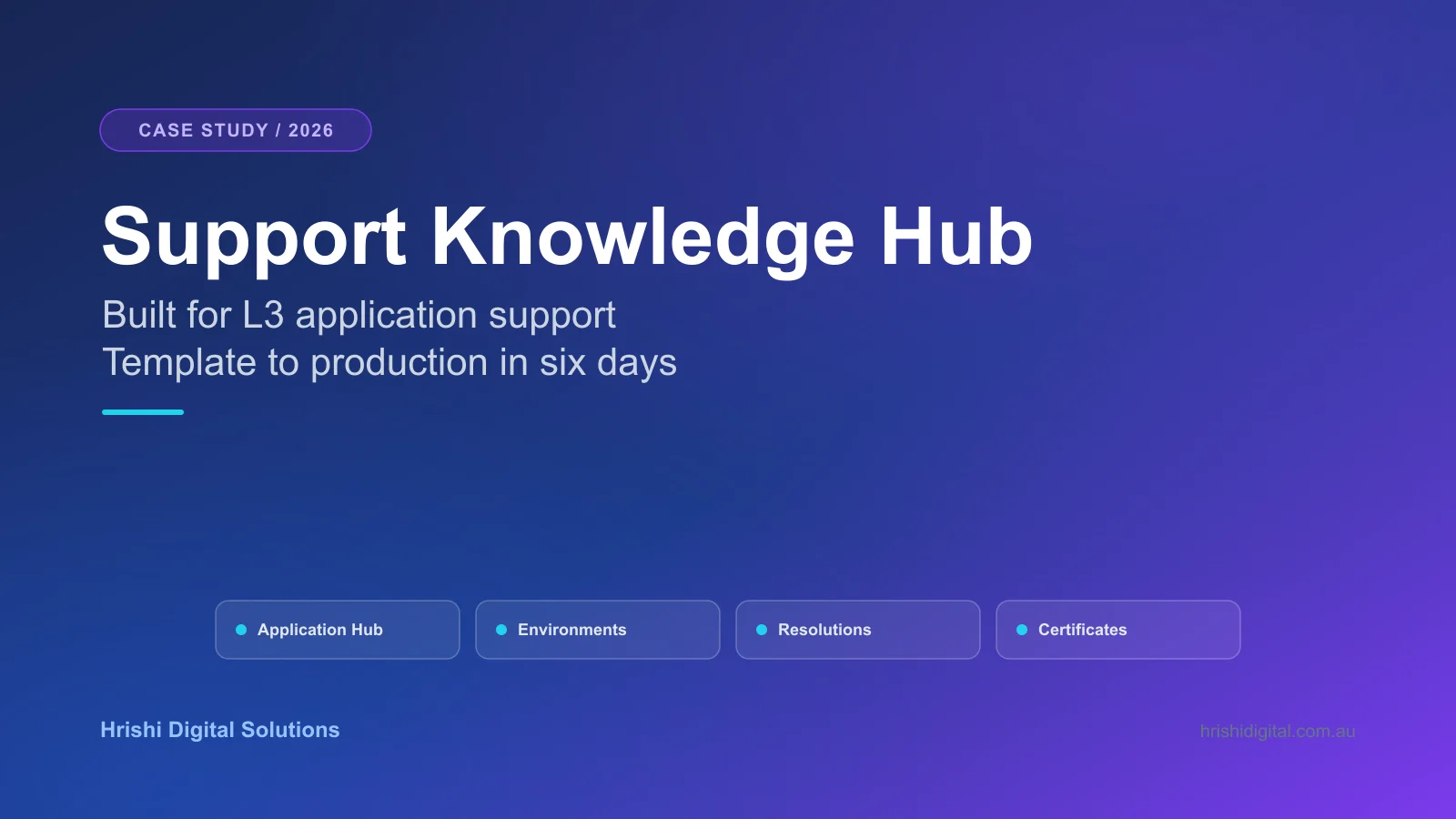
It is 2am and a production system just went down. The Level 3 support engineer on call does not spend the first ten minutes diagnosing the bug. They spend it hunting for the right URL, the right escalation contact, and confirming which environment is actually production. That gap, the operational knowledge layer that sits underneath ServiceNow but lives nowhere inside it, is what we built Support Knowledge Hub (SupportHub) to close.
SupportHub is a local-first, LAN-accessible knowledge platform built for Level 3 application support engineers who keep large application estates running day to day. We built it for our own use, going from a bare Clean Architecture template to a tested, multi-feature system running on HTTPS in six calendar days, using an AI-architect, AI-implementer workflow rather than a traditional development team. This post covers what SupportHub does, the architecture decisions behind it, and the disciplined process we used to ship it that fast without cutting corners on quality.
The 2am Problem: Why L3 Support Doesn't Have One System of Record
Enterprise IT support has a structural knowledge problem. A Level 3 application support engineer responsible for 80 or more production applications does not have one system of record. Instead they have a mess of overlapping, half-current sources:
- ServiceNow, which owns incidents, problems, and changes, but not how the application actually works.
- Wikis and SharePoint pages that go stale within a week of being written.
- Spreadsheets tracking servers, TLS certificates, and Azure resources by hand.
- Tribal knowledge sitting in Slack DMs and the heads of whoever has been on the team the longest.
None of that is ServiceNow's job, and none of it lives in one place. When an incident hits, the real cost is rarely diagnosing the bug. It is finding the right URL, the right contact, the right runbook, confirming which environment is actually production, and checking whether the TLS certificate on that environment expires this week.
SupportHub is deliberately not an ITSM system. It does not compete with ServiceNow. It is the missing layer underneath it: a single source of truth for what an application is, where it runs, who owns it, what has broken about it historically, and how to fix it fast. ServiceNow ticket references are stored as links back to ServiceNow, not duplicated.
It is not an ITSM system. ServiceNow owns incidents, problems, and changes; SupportHub only stores references back to them.
Finding information fast during an incident is the platform's stated design principle, and it shaped every screen we built.
Meet Support Knowledge Hub
SupportHub is built around one idea: the application is the hub, and everything else, environments, servers, certificates, known issues, contacts, is a tab on it. We call this an app-centric master-detail information architecture, because during an incident an engineer thinks in terms of which application is broken, not which database table holds the data.
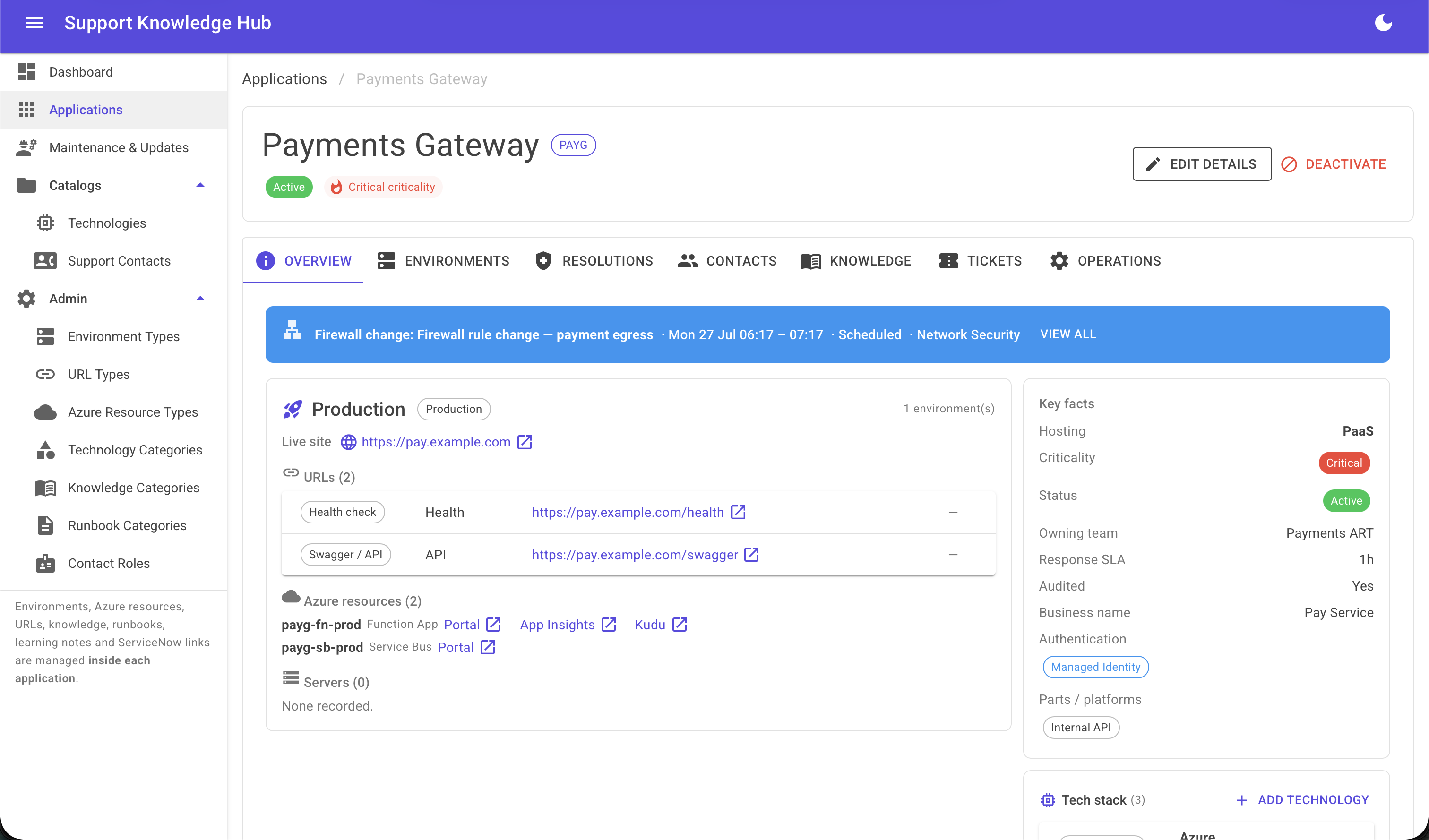
Each application gets one page showing its status, criticality, hosting model (PaaS, IaaS, or hybrid), owning team, SLA hours, purpose, audit flags, commission and decommission dates, and free-form tags for auth methods and client platforms such as iOS, portal, SharePoint, and Power Apps.
From there, six tabs hold everything an on-call engineer needs:
- Overview. Auto-resolves the application's production environment and surfaces its URLs, servers, and Azure resources, each deep-linking out in a new tab, the top open known issues, and a maintenance banner, all in one glance.
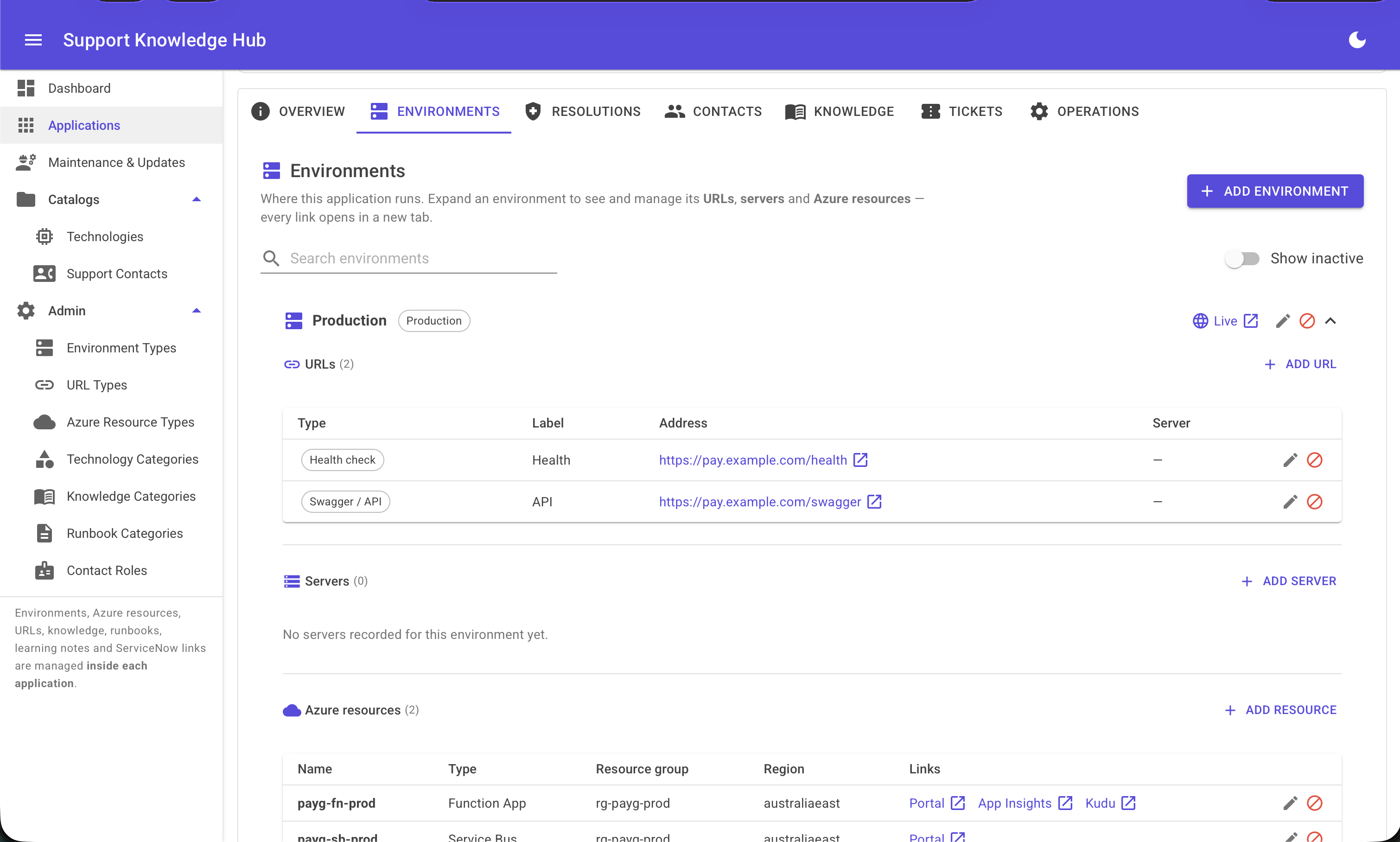
- Environments. Dynamic and user-named rather than assuming a fixed Prod, UAT, Dev split. Each one expands to its own servers, URLs, Azure resources, and certificates, with colour-coded expiry warnings: red for expired, amber for anything inside 30 days.
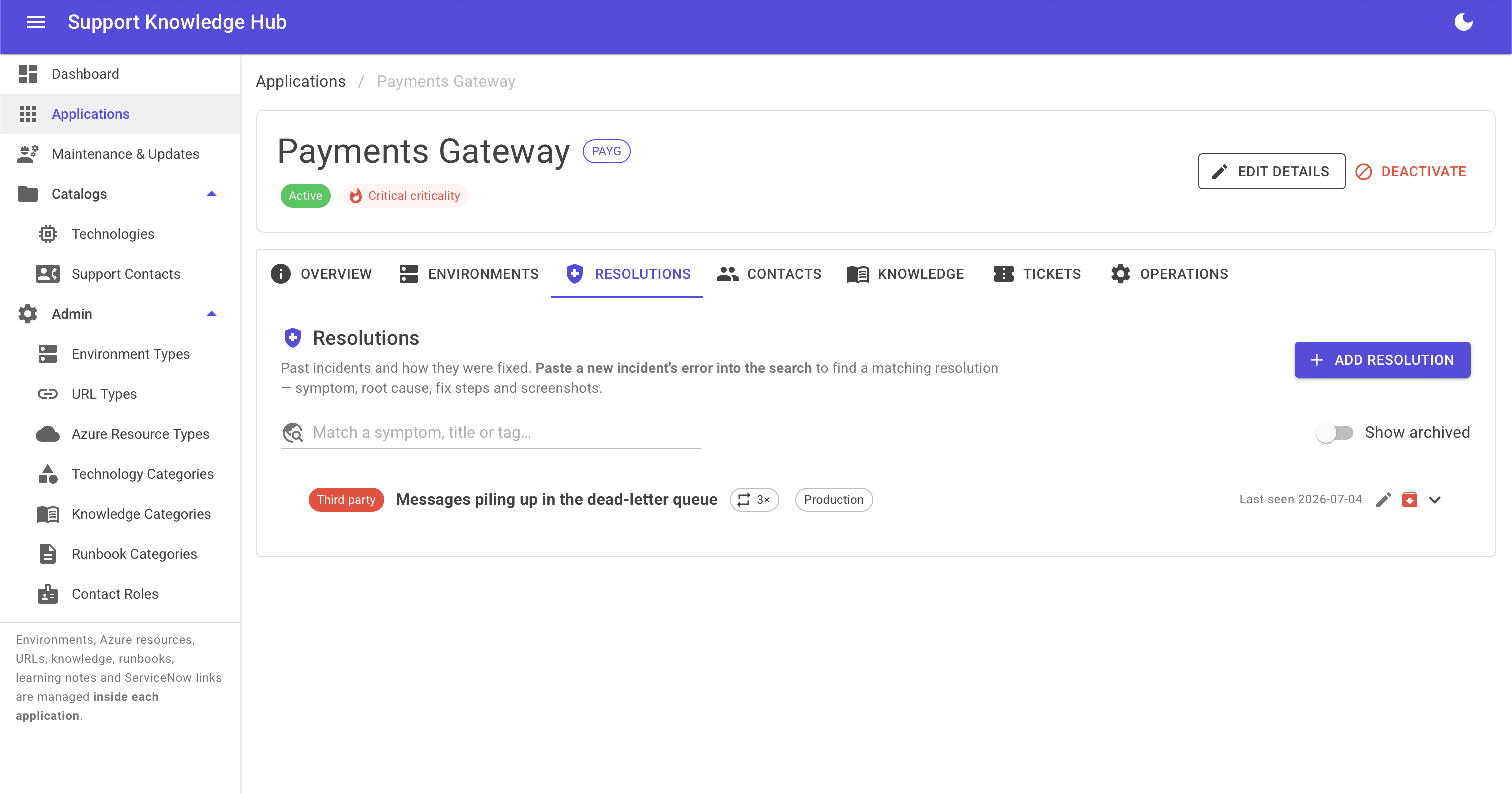
- Resolutions. A searchable symptom-to-fix matcher with screenshot attachments, so a recurring issue's fix is one search away instead of asking whoever remembers it from last time.
- Maintenance & Updates. Global outage and change announcements that automatically surface as a banner on every application they affect.
- Contacts. A shared directory of people and teams linked to applications by role: primary, escalation, or vendor.
Rich text is available everywhere prose matters, purpose fields, descriptions, resolution notes, and every write is sanitised server-side before it is stored. SupportHub itself runs LAN-only with HTTPS by default and no cloud dependency, so an organisation's operational data about its own production estate never has to leave its network.
The Tech Stack, and Why Each Piece Was Chosen
SupportHub's stack was chosen for what it does not require as much as for what it does.
| Layer | Choice | Why it matters |
|---|---|---|
| Runtime | .NET 10, C# latest, nullable enabled | A current, LTS-track stack, not legacy .NET Framework |
| UI | Blazor Server + MudBlazor | Server-rendered interactive UI with no separate JavaScript SPA or API layer to maintain |
| Data | EF Core over SQLite, schema kept provider-neutral | Runs today with zero external dependencies, just a file, but can move to SQL Server or PostgreSQL without a redesign |
| Architecture | Clean Architecture (Domain, SharedKernel, Application, Infrastructure, Presentation), enforced by architecture tests | The dependency direction is not aspirational. A layer violation fails the build |
| Pattern | CQRS without MediatR, custom ICommandHandler and IQueryHandler interfaces | A deliberate choice of a leaner, more explicit approach over a popular library |
| Data access | No repository pattern, a short-lived IApplicationDbContextFactory per unit of work | The safer pattern for Blazor Server's long-lived circuits |
| Validation | FluentValidation | Business rules stay out of the UI layer |
| Dependency injection | Scrutor, assembly scanning and decorators | Less manual registration boilerplate as the entity count grows |
| Error handling | Result pattern, not exceptions, for business outcomes | Predictable control flow for expected failure cases |
| Data integrity | Soft delete only (Deactivate methods), full audit timestamps on every entity, reactivation supported everywhere | Nothing a support engineer relies on disappears by accident |
Two decisions are worth calling out specifically. Every rich-text write, purpose fields, descriptions, resolution notes, is sanitised server-side using Vereyon.Web with a pinned HtmlAgilityPack version. We deliberately avoided a more popular rich-text and sanitiser combination, MudExRichTextEditor paired with Ganss.Xss, because it hard-pins vulnerable transitive dependencies that our build correctly rejects under a warnings-as-errors, NU1902-enforced policy. And dotnet build has to produce zero warnings across the whole solution, with warnings treated as errors, on every commit.
How It Got Built in Six Days
The product is one story. How it got built in six calendar days, 19 to 25 July 2026, is the other, and for a digital agency it is arguably the more useful one to tell.
A Written Constitution, Not Tribal Knowledge
The repository has a CLAUDE.md file that is the literal single source of truth for how the codebase gets built: the tech stack, ten numbered hard rules, the dependency direction, naming conventions. Every contributor, human or AI, reads it before writing a line of code. It is the same discipline we apply to our own delivery work, not a one-off written for this build.
One AI Tool, Two Disciplined Roles
Claude built this end to end, but never in one undifferentiated mode. We ran it in two named, separated roles: architect and reviewer in one session, implementer in another. As architect, Claude sliced tasks, made the architectural calls, and reviewed every feature against a written review checklist before it was allowed to be committed. As implementer, it picked the next task off a maintained backlog and built it by copying the reference implementation. The loop stayed explicit at every step: define the task, implement it, get the build and tests green, review it against the checklist, then commit. Small, reviewed increments, never a large unreviewed pile of changes.
The Golden Pattern
Instead of letting every new feature invent its own shape, we picked one reference feature, Applications, and mandated that every subsequent entity be a byte-level copy of its structure. Consistency was not a style-guide aspiration here. It was a copy-paste rule.
Building a Code Generator, Mid-Project
After hand-copying the golden pattern for a run of entities, we wrote a Python scaffolder that generates the roughly 18 mechanical files a new entity needs from a short JSON spec. It lives outside the main solution file on purpose, so it structurally cannot break the zero-warnings build. We proved it end-to-end on the Certificates feature, found and fixed generator bugs in the process, then used it to ship that feature's backend. We did not just use AI to write code faster. Partway through, we used AI to build a tool that writes the next features for us.
The Pace, Documented
Bare Clean Architecture template to a working multi-entity system with HTTPS, database migrations, seeded demo data, and 30 or more passing tests, in six calendar days. Dated commits and a running progress log, updated at the end of every session, back that timeline up.
Self-Correcting, Not Self-Congratulating
The build log documents a real bug hunt partway through the project: demo data silently failing to seed because of a stale local database. We root-caused it and fixed it, and left the record intact rather than tidying it away. That is closer to what real AI-assisted engineering looks like day to day than a narrative where everything just works on the first try.
Why This Matters If You're Running 80 Applications on One Team
None of the above matters if it does not change what happens at 2am. The value case for a tool like SupportHub comes down to a handful of concrete effects:
- Faster incident resolution. An on-call engineer's first move during an outage is finding the right application. When everything relevant sits one page away instead of scattered across five systems, mean time to resolution drops.
- Less key-person risk. Knowledge that used to live only in a senior engineer's head, which application uses which auth method, which certificate expires next, who the escalation contact is for a given vendor, becomes a searchable record instead.
- Faster onboarding. A new support hire can self-serve context on dozens of applications instead of shadowing someone for months.
- Data ownership by default. Local-first and LAN-only, with no cloud dependency required, so an organisation's operational data about its own production estate never has to leave its network.
- Cheap to run and easy to extend. SQLite and a single Blazor Server process. No microservices, no message bus, no separate front-end build pipeline to maintain.
- Additive, not competitive, with your ITSM tool. It sits alongside ServiceNow or any other ITSM system, so there is no rip-and-replace objection standing between an organisation and adopting it.
Where This Pattern Applies Beyond L3 Support
The 80-plus-application profile SupportHub was built for shows up well outside general IT support. The pattern, an application-centric hub tracking environments, certificates, and on-call knowledge, generalises to any team managing a large, long-lived application estate:
- Banking and financial services. Core banking, payments, and trading systems, each with its own environments, certificates, and vendor contacts, in a sector where regulators expect documented operational knowledge and clear ownership.
- Healthcare and health-tech. Clinical and administrative systems where an outage carries patient-safety stakes, and where certificate, URL, and contact tracking matters for compliance audits.
- Insurance. Claims, underwriting, and policy administration platforms, often a mix of legacy and modern applications, close to the exact profile SupportHub was built for.
- Telecommunications. OSS and BSS systems and network management tooling, with on-call intensity high enough that fast symptom-to-resolution matching pays for itself quickly.
- Manufacturing and logistics. Plant systems, ERP integrations, and warehouse or fleet software spread across sites, each with local infrastructure quirks worth documenting once.
- Retail and e-commerce. POS, inventory, and storefront systems, where peak trading events make knowing your production topology instantly a revenue issue, not just an IT one.
- Government and public sector. Long-lived legacy application portfolios and high staff turnover make a strong case for a locally hosted knowledge base with no cloud vendor lock-in, an area where our own government sector work already lives.
- Higher education. Dozens of departmental and enterprise systems, student information, learning management, HR, and finance, typically supported by a small central team.
- Managed service providers. Multiple client environments to track, with a per-client instance close to the core of what an MSP already needs to deliver.
These are listed as fit, not deployment history. We built SupportHub for our own L3 support use first, but the underlying pattern is not specific to that job title.
Key Takeaways
- Enterprise IT support has a structural knowledge gap that ServiceNow, wikis, and spreadsheets do not close between them, and SupportHub is the layer that sits underneath ServiceNow, not a replacement for it.
- We took SupportHub from a bare Clean Architecture template to a tested, HTTPS-served, multi-feature platform in six calendar days.
- The build used a disciplined AI-architect, AI-implementer workflow: a written constitution, one golden reference feature copied byte-for-byte, and small increments reviewed before every commit.
- Partway through, we built a code generator to scaffold new features from a JSON spec, rather than continuing to hand-copy the pattern.
- The same discipline, Clean Architecture enforced by architecture tests, a zero-warnings build, and careful dependency hygiene, applies to client work, not just this internal build.
Built the Same Way We'd Build Yours
SupportHub exists because we lived the pain it solves. As a team building enterprise web applications and providing ongoing technical support and partnership for Australian businesses and government agencies, we needed exactly the tool described above, and building it ourselves was faster than adopting something built for a different problem. It is also a live example of how we use AI pair-programming to ship real internal platforms, not chatbots or demos, on a documented, disciplined timeline. If your organisation manages a large application estate in any of the industries above and this problem sounds familiar, book a consultation and we can talk through what a tailored version would look like for your environment.
Related reading
Hrishi Digital Solutions
Enterprise web application and legacy modernization specialists in Darwin and Perth. We build internal operational platforms and apply the same AI-native engineering discipline to client work that we used to ship this one.
Contact Us →